Tips on Avoiding Common Distractions when WFH

Despite many companies enforcing ‘back to office’ policies in 2026, the fact is that a large proportion of the UK workforce works from home (WFH) on at least a semi-regular basis.
According to the most recent figures (March 2022), ONS data show that 9.9 million people were homeworking, and roughly 2.8 million non-homeworkers (who did not primarily work from home) reported working from home at least one day a week.
With these stats in mind, we commissioned a national survey* to uncover the biggest distractions that people most commonly face when working from home, and also collaborated with experts to give further insights and advice into how we can become more productive on WFH days.
Common WFH Distractions
The majority (84%) of those surveyed were regularly distracted from productive work when WFH - at an average of 63 minutes and 17 seconds in a normal WFH day.
This equates to 5 hours, 16 minutes, and 25 seconds wasted each week due to distractions, meaning approximately 13% of working hours are affected (based on a standard working day of 7.5 hours). Annually, this clocks up to more than 15,947 minutes (or approximately 266 hours) per year. To put this into context, this amounts to more than 33 working days per year wasted to distractions for each WFH employee!
When asked which scenarios they found most distracting when WFH, it was social media scrolling that came out on top as the most likely example to negatively impact focus - with 30% of our survey respondents selecting this option. Non-work-related messaging apps - such as WhatsApp, Facebook messenger etc. - came in second place (27%), followed by browsing news websites (24%).
Dr Bradley Powell, a chartered clinical psychologist verified on the healthcare platform Doctify shared insights into how to minimise the impact of digital distractions - he shared that “most digital distraction is not about weak discipline but about the brain seeking quick emotional relief when a task feels boring, effortful or uncertain. We’ve all been there, reaching for the phone when we are bored, without even realising it too much time has passed!
“Small environmental changes can make a big difference. For example, starting the workday sitting on the sofa subtly signals relaxation to the brain, making it harder to focus. Using a consistent desk or chair helps create a mental association with concentration instead.
“Turning off non-essential notifications, keeping the phone out of reach during focused work, and using short timed work blocks can also support attention. Defining a very small starting step, such as writing three bullet points, reduces overwhelm and builds momentum. Productivity at home is less about willpower and more about shaping the environment so you nudge the brain towards focus mode.”
In fourth and fifth place were being interrupted by children (23%) and being interrupted by partners (21%). On this, Dr Powell added that “WFH blends personal and professional relationships, and many people avoid setting boundaries because they feel guilty, yet without boundaries the day becomes fragmented and stressful.
“Having a clear and kind conversation at the start of the day, regarding the specific focus periods and times you can be interrupted, or connect, can really help, especially when paired with simple signals like a closed door or headphones. Planning lighter, interruption-friendly tasks for busier times of day can also reduce frustration. It is important to note that moments of genuine connection, like having lunch with your partner, between work blocks often improve focus rather than harm it, so these healthy boundaries are there to protect both productivity and relationships.”
The remainder of the top ten distractions include watching television or streaming videos (18%), receiving deliveries - such as from the postman or a courier - (17%), pets (16%), doing laundry (13%), and cooking and tidying or cleaning (both 13%).
Other notable distractions include procrastinating (11%) and daydreaming (7%), online shopping (9%) or running personal errands (9%), pain or discomfort due to either poor seating choice (7%) or improper desk setup (6%), and even having sex (4%).
The Health Implications of an Uncomfortable WFH Setup
With poor seating choice or improper desk setup causing pain or discomfort for a significant portion of homeworkers, we spoke to two healthcare experts - Nathan Edmondson, a physiotherapist at Williams Human Performance, and Elizabeth Moreno (M.Ost PgCert SPOP), a principal osteopath and clinic director - to share the signs that your seat choice or desk setup are causing issues.
Read the full Q&A below.
Make Room Outside (MRO): What are the signs that your seat choice or desk setup are causing issues?
Nathan Edmondson (NE): “Any prolonged position, pressure or posture is likely to start causing discomfort, especially if your seat is uncomfortable or if you’re hunched over your desk for a longer period of time. In short, if you are uncomfortable, it’s a sign that your seat choice or desk setup is causing issues. This could present as aches, pains, or pins and needles type sensations, and is your body telling you to move!”
MRO: What are the symptoms that your SEAT is causing issues?
Elizabeth Moreno (EM): “As osteopaths, we frequently encounter low back pain, which makes up 43% of all work-related musculoskeletal disorders. This isn't surprising, given how many hours people spend sitting—our bodies evolved for movement, not extended periods of inactivity! If you're experiencing stiffness in your back, non-specific low back pain, buttock pain, shoulder tension, or leg numbness, it may be a sign that your work chair isn't suited for you”.
MRO: What are the symptoms that your SCREEN is causing issues?
EM: “Achieving an ergonomic setup is essential; it's not just about having a good chair. Neck pain accounts for 41% of work-related musculoskeletal complaints in the UK, making it the second most common issue linked to poor desk posture. Neck stiffness, eye strain and headaches can indicate that you are too close or too far from the screen, as well as clenching or grinding your jaw at work (as tight neck muscles often translate to tight jaw muscles).”
NE: “Your screen could be an issue if its position relative to your seat and desk is uncomfortable - if it causes you to strain your neck for a prolonged period of time, it could result in neck, upper limb, and back aches and pains.”
MRO: What are the symptoms that your DESK is causing issues?
EM: “Look out for arm and hand discomfort - if you’re experiencing tingling, tension, or tenderness in your forearms or hands, it’s time to reassess the positioning of your keyboard and mouse. Additionally, arthritis at the fingers and the base of the thumb is quite prevalent among those who spend long hours at their desks. If you regularly type, use a laptop touchpad, or text extensively, it’s highly likely you will encounter some level of tension or discomfort in your hands, wrists, or forearms.”
MRO: Do you have any other insights or tips on the topic?
NE: “Prolonged sitting isn’t inherently bad, and in fact is sometimes unavoidable… Research in 2026 - which included a systematic review of over 1 million people - showed that those who sit for >8 hours a day but also do 60 mins of moderate activity a day had no increased risk of death. They also showed those who don’t sit for long still have significantly higher risks of death if they don’t exercise much…
“If your job requires lots of sitting, then it’s best to counteract this with exercise outside of working hours. Try to move little and often, alternate from standing to sitting desks, take walking meetings or calls. If you’re experiencing pain, which you feel might be related to your prolonged sitting habits or desk setup, then it’s best to seek the advice of a qualified health professional who can thoroughly investigate the cause of your symptoms, give advice on positional and exercise habits, and guide building a robust body.”
How to Optimise Your WFH Setup
Osteopath Elizabth Moreno shared the below guide to optimise your setup:
Screen placement, and desk & arm position
Small adjustments can also significantly reduce neck, shoulder, and wrist strain - aim for:
- Position your monitor so the top of the screen is at or just below eye level, about an arm’s length away
- This keeps your head neutral (ears over shoulders) and helps prevent forward head posture — often called ‘tech neck’
- Elbows at ~90° with forearms parallel to the floor
- Wrists straight and relaxed (not bent up or sideways)
- Keyboard and mouse within easy reach
- Shoulders relaxed, not shrugged
- Forearms supported by desk or armrests
Moreno continued to share further insights into the importance of chair and body alignment, posture, movement, and circulation support:
Chair & body alignment
Moreno explained: “Chair quality is 30–40% of the solution, and your chair should support your natural lumbar curve. Built-in lumbar support is ideal. If your chair lacks this, add a lumbar pillow or roll. Sit back into the chair so the support contacts your lower back, don’t perch on the edge.”
Posture matters — but movement matters more
Moreno explained: “Movement and posture habits are 50% of the solution (posture approximately 30%, and movement breaks approximately 20%). I often tell patients that good posture helps, but staying still too long is what really causes problems. Most people’s posture naturally deteriorates after 20–30 minutes. Instead of forcing ‘perfect posture’ all day (which isn’t realistic), prioritise movement every 30 minutes. Even a small position change helps. Movement reduces stiffness, restores circulation, and unloads tired tissues.”
Movement is medicine
Moreno added: “We strongly promote the idea that movement is medicine. Posture and core habits account for roughly 10–20% - but regular movement and endurance matter more. Dynamic posture beats rigid posture every time.”
Movement rules
- Stand up or shift position every 20–30 minutes
- Roll your shoulders, gently arch your mid-back, or take 30–60 seconds to walk
- Think frequent resets, not rigid posture
- Alternate between sitting and standing (e.g. with a sit–stand desk) to help reduce spinal compression and static load
- When sitting:
- Keep hips slightly higher than knees to support a neutral pelvis and natural lumbar curve (you can achieve this by slightly tilting the seat base.)
- Sit back into lumbar support
- Keep feet flat on the floor — or use a footrest if needed
- When standing:
-
-
- Maintain a soft bend in the knees
- Keep spine neutral — avoid locking knees or pushing hips too far forward
- Shift weight occasionally rather than standing rigidly
-
Circulation support
Moreno shared: “Healthy circulation is central to the body’s ability to heal and function. Compression socks can help reduce lower-leg fatigue and swelling, especially if sitting or standing for long periods. The real goal isn’t perfect posture — it’s about variability and circulation”.
Offering a quick summary of his recommendations, physiotherapist Edmondson added: “You should aim to avoid unnecessary strain in positions you are likely to sustain for a long time, so during those unavoidable long periods of sustained postures, experiment with A) your desk height so that your shoulders don’t feel strained, B) your screen height so that your neck isn’t strained, and C) your chair height and support level so that your low back isn’t straining.”
The Importance of Zoning Your WFH Environment
Our survey also highlighted that the majority (77%) of respondents have a designated workspace at home for WFH days, but only 47% have a separate room or space that provides a clear boundary between work and home life. And this makes a big difference to how susceptible we are to distractions…
The survey highlighted that WFH employees who either have a designated space but within an open plan (or within the wider communal) living space OR who change the spot that they WFH from on a regular basis were most susceptible to distractions overall - with most of these cohorts admitting to being negatively impacted by distractions when WFH (94% and 91% respectively).
In comparison, these figures drop to 79% for WFH employees with a separate workspace, and further to 73% for those who attend an external space (e.g. co-working/cafe) when WFH.
Psychologist Dr Powell continued “productivity at home begins with the signals we give the brain. Many people tell me they stay in pyjamas, skip showering, and start work from the sofa, which subtly communicates rest rather than focus. Creating a clear psychological shift into ‘work mode’ can make a significant difference…
“Simple steps such as getting dressed, preparing a tidy and distraction-free workspace, and beginning the day with a short walk or exercise help the brain recognise that the working day has started. Environment also matters - using a consistent desk or chair helps create a mental association with concentration instead.”
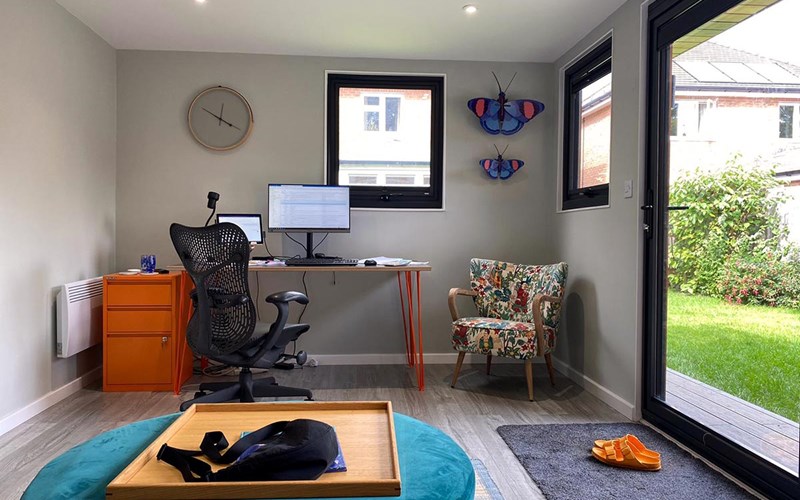
If you’re struggling for space, peace and quiet when working from home, or your work regime is affecting your work-life balance, then a fully insulated garden room (complete with all the necessary services, from power and heat to wifi) could be the perfect solution to match your working requirements.
Benefits of Building a Garden Office

Potential benefits of using a garden room as an office include a clear separation between work and home life, a quieter, more focused space, clearer boundaries, and a sense of ‘going to work’. Plus, it’s also a great investment for the future as it’s likely to increase the value of your property.
In addition to improving productivity, a separate workspace at home can support mental health by reducing overwork, burnout, and mental spillover. On this,
Dr Powell explained, “burnout rarely starts with a collapse, though I’ve seen in the clinic room that this is how it can finish, if not addressed early. The early signs are subtle: feeling flat, unusually irritable, bored, or mentally slowed, such as rereading emails without taking them in.
“Many professionals describe a growing sense of resentment, or brief flashes of ‘I can’t cope with this’, quickly followed by the pressure to push through anyway. Sleep may feel unrefreshing, and coping habits can subtly drift towards more sugar, caffeine, alcohol, or late-night scrolling or working, all of which make the situation worse and pull you further away from balance and a meaningful life.
“These signs reflect a nervous system under strain without enough recovery. These early signals matter as this is where we can step in before the collapse. Having proper breaks, reducing unnecessary load where possible, and speaking openly with a manager can prevent temporary stress becoming exhaustion”.
Adding to this, Edmondson reminded us not to forget that “mental and physical health are completely co-dependent - avoiding burnout, giving the opportunity for regular breaks, flexible working patterns, having friends and accountability, and a pleasant and comfortable work environment all pay dividends.”
As discussed, avoiding distractions when working from home is less about willpower and more about designing your environment, boundaries, and habits so distractions don’t take hold.
Tips to block distractions
Here are a few tips to consider when designing your workspace to block distractions:
- Use a garden room as a dedicated work zone - only work should happen in here (no scrolling, no TV), face away from any temptations
- Keep your phone out of arm’s reach - drawer > desk
- Eliminate digital distractions - control notifications and use website blockers
- Build ‘start’ and ‘stop’ rituals - key to preventing distraction caused by mental spillover
Also, as research shows that thinking about stressful work activates the same hormones as doing stressful work, Dr Powell particularly recommends ‘stop’ rituals: “The brain does not easily distinguish between doing stressful work and thinking about it, which is why unfinished tasks can keep the body in a state of tension long into the evening. A short shutdown ritual, such as writing tomorrow’s priorities and tidying the workspace, helps signal psychological closure.
“Physically closing the laptop and moving into a different room strengthens that boundary. Plus, activities that fully absorb attention, like exercise, cooking, or good conversation in a different setting, shift you out of work mode far more effectively than passive scrolling”.
Other Considerations for Garden Office Setups
It is also worth noting here that most garden offices don’t require planning permission, as they come under the description of ‘permitted development’, but there are some situations where it will be necessary. If you live in a listed building, for example, or in an area of outstanding natural beauty, it will be a prerequisite. Proximity to other buildings may also be an issue.
Other factors, meaning you will need formal permission, include if the finished garden room is larger than 30m2 (internal floor space), occupies more than 50% of the land around your home, or is located in front of the front elevation of the house. A small garden room with dedicated office space might still be possible.
In general, if your garden room is a single-storey building and none of the above applies, you won’t need to secure planning permission. However, it is always worth checking with your local authority.
If you are considering adding a garden room to use as an office space, why not take a closer look at our range of garden rooms. You can also request a brochure, or visit our show village in Halifax.
*This research was run with TLF (The Leadership Factor) in January 2026
Feb 16 2026